







Axis2 Web Service using Eclipse
16/12/2012
Recently I have been writing introductory tutorials about web services in Java. We saw about SOAP based hello world web services and how to create them using Eclipse andNetbeans. Now this tutorial is about getting started with Axis2 based webservice using Eclipse.Axis2 Web Services
There are different web service implementation engines available for Java. Axis2 from Apache is the popular web service stack. In this hello world tutorial, we will use Axis2 for implementing a simple web service using Eclipse wizards. Eclipse does not come with pre-configure Axis2 setup. So the key to creating a web service using Eclipse for Axis2 is setting up the Eclipse.
Step 0: Eclipse Preparation for Web Service with Axis2
See when we are lazy and want all the job to be done by an IDE, we should have the right setup and configuration. To create a RESTful webservice with Axis 2 using Eclipse wizard ensure the following.- Use Eclipse Java EE IDE for Web Developers.
- Have the latest Dynamic Web Module updated. It is better to use 2.5 of dynamic web module version. Simple and easy way is to have a latest IDE download as it will come bundled with latest modules.
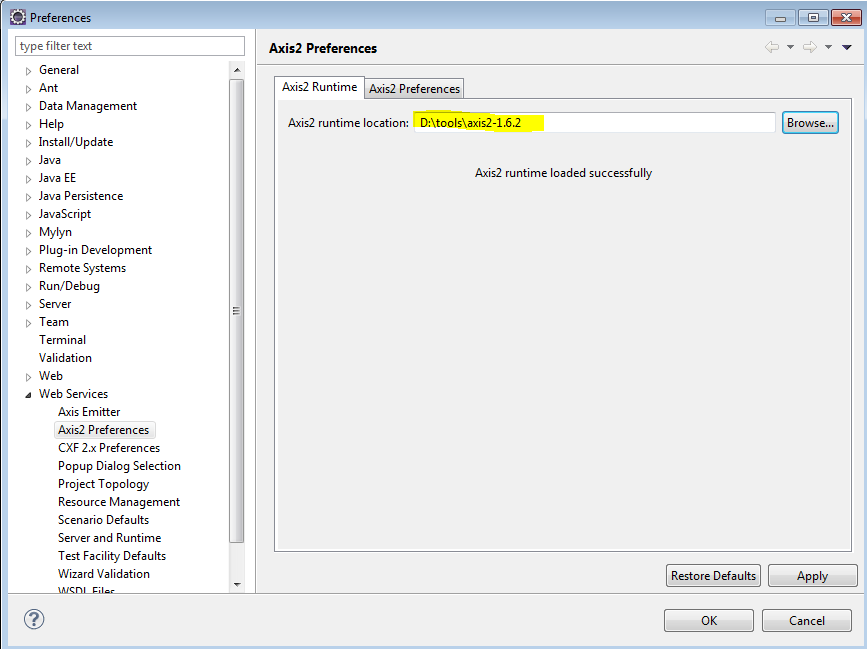
- Download Axis2 binary from Apache Axis website download page, unzip it and configure that foder in Preferences -> web service Axis2 runtime (refer image below)
If you are in a hurry, just download Axis2 Web Service and Client project and execute it. You should add Axis2 jars in lib folder.
